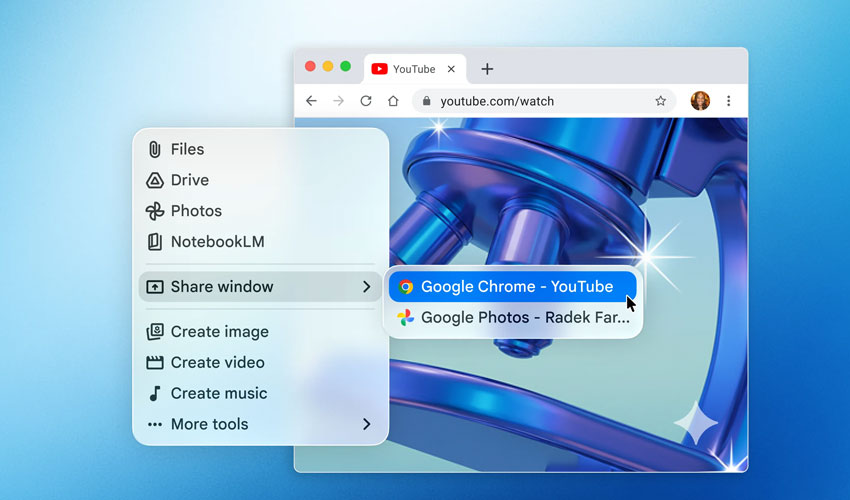
In a direct push against ChatGPT, Google has rolled out a native Gemini app for Mac users. The move signals a shift from browser-based AI tools to a more integrated desktop experience.
Google has officially launched a dedicated Gemini app for macOS, turning what was once limited to a browser into a full desktop tool.
This change allows users to access Gemini instantly using a simple keyboard shortcut — Option + Space — without needing to open a browser tab.
The update is designed to streamline daily workflows, especially for users who rely heavily on AI tools throughout the day.
Faster access without breaking workflow
One of the biggest upgrades is how quickly users can interact with Gemini.
Instead of switching tabs or apps, Mac users can now summon the AI assistant instantly. This reduces interruptions and keeps work flowing, addressing a common frustration with existing AI tools.
Google appears to be positioning Gemini as a seamless part of everyday desktop usage rather than a separate tool.
Screen sharing and real-time analysis
The macOS app introduces a more context-aware experience.
What Gemini can do
- Analyse your screen or specific windows
- Summarise documents and reports
- Extract key insights from charts or spreadsheets
- Explain content from local files
This means Gemini responds based on what you’re actively viewing, not just what you type — a step toward more practical, real-time assistance.
Built for productivity and creativity
Google is also expanding Gemini’s capabilities beyond text.
New Creative Features
- Image generation using Nano Banana
- Video creation powered by Veo
These tools allow users to create visuals directly within their workspace, eliminating the need to switch between different platforms.
A key focus of this launch is reducing “context switching” — the constant jumping between apps, tabs, and tools.
By embedding Gemini directly into the desktop, Google aims to keep everything in one place, making workflows smoother and more efficient.
The Gemini app is available starting today for devices running macOS 15 and later.
It is rolling out globally at no cost for existing Gemini users and can be downloaded directly from Google’s official website.
Google has described this release as a “first version,” indicating more features are expected in the future.
The company plans to evolve Gemini into a more proactive assistant that integrates deeper into daily computing tasks.




.jpg)